


Violet Scripts: Bringing CI/CD to Hardware
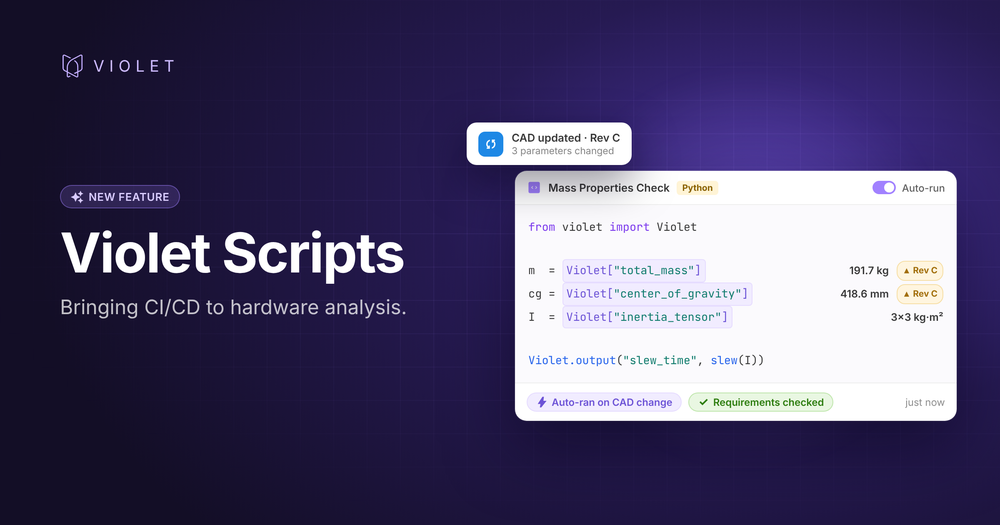
Why your simulations are always a few weeks behind your design, and how to fix it.
On a typical spacecraft program, the Attitude Control System (ACS) and Guidance, Navigation, and Control (GNC) teams need the satellite's latest mass properties to size components, perform trades, and run simulations: total mass, center of gravity, moments of inertia, surface areas.
Those numbers live in CAD, owned by the mechanical team. So the systems engineer asks the CAD lead for updated values, who then collects the latest changes from every subsystem team, exports the numbers, and drops them in a spreadsheet attached to a ticket.
End-to-end, this flow can take weeks. By the time the numbers reach their destination, the design has already moved on.
Disconnected systems drive a broken process
Fragmented data and disconnected scripting environments lead to a workflow that is broken by definition:
- Too many handoffs. A single number gets relayed from subsystem teams to the CAD lead to the systems engineer to the GNC team. Like a game of telephone, every handoff adds latency and an opportunity for error.
- Siloed access. The systems engineer probably can't pull values from CAD directly, and neither can the GNC engineers. And the mechanical team has nowhere to push live values.
- Hard-coded snapshots. The GNC team likely copies and types the values straight into their models and simulations. Each number is a frozen copy, with no link back to where it came from.
- Stale on arrival. Hardware designs change constantly. By the time the numbers land, they likely no longer match the current state of the spacecraft design.
This isn't just a big-team problem. An engineer sizing batteries or an attitude control system on their own goes through a micro version of the same loop: pull numbers into Excel or MATLAB, run the calc, paste results back, and repeat every time something changes.
Software engineers solved this for software engineers
Early on, software engineering teams faced a similar problem: distributed engineers changing many things at once. The answer that emerged was continuous integration and continuous delivery (CI/CD). Every change gets continuously tested, reviewed, and merged, ensuring the end product is continuously cohesive and correct. And a rich ecosystem of tools, connectors and infrastructure has evolved to enable it.
Hardware teams lack the tools to achieve this. So while the products we build keep getting more and more advanced, the way we design, model, test and build them has remained stagnant. Simulations run against whatever numbers someone last copied in, analyses are only rerun when requested.
We believe hardware deserves its own version of CI/CD. With connected tools and live data, this workflow should be instantaneous: not only tightening the iteration feedback loop, but limiting the opportunity for error and enabling data visibility along the way.
Closing the loop with Violet Scripts
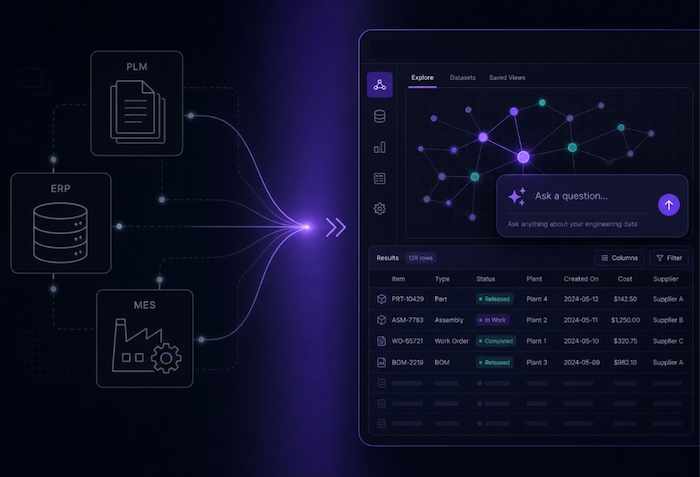
Violet already keeps engineering and manufacturing data in sync across tools like CAD, PLM, and ERP. Scripts adds the analysis layer with Jupyter-style notebooks, built into Violet, that run Python, MATLAB or Julia directly on that live data.
Here’s how the process looks with Violet:
- One shared source. The mass properties team keeps a shared Parameter set in Violet, updated by engineers or synced automatically from CAD, live Google Sheets or Excel data, rollup scripts, etc.
- Live inputs, not hard-coded numbers. The GNC team's script references those values directly, with a line like Violet["center_of_gravity"]. Every run uses the current number and traces back to its source. Scripts can reference any Violet data: a parameter, a requirement, a part property from a connected tool, or another script's output.
- Auto-run on change. When a mass property changes, scripts that are set to “Auto-run” re-execute, notify stakeholders on new results, and update downstream consumers of the outputs automatically. No request, no waiting, no copy-paste.
- Requirements are checked against results. Script outputs can feed Parameters, Requirements and Verifications, so everyone can see whether the design is still in spec whenever changes are made.
The month-long loop shrinks to the time it takes for a script to run. And every team works from the same live picture of the design.
What also changes for the team:
- Every number is traceable. Each value links back to its source, so you can justify any result in a design review.
- Gaps show up early. Analysis reruns with the latest data, so a design drifting out of spec gets caught in days, instead of at the next major milestone.
- Engineers get back to engineering. No more chasing values or shuffling spreadsheets.
What else you can build
Mass properties are just one example. The same pattern works for any calculation or script that depends on changing parameters or external data:
- Budget roll-ups for mass, power, or cost that stay current as subsystem estimates change
- Performance checks that validate key design parameters like predicted thrust, efficiency, or range against requirements
- Cross-system reconciliation, such as flagging parts whose mass in CAD doesn't match the mass in PLM
- Bridges to tools without a native integration by calling the tool's API from a script and bringing its data into Violet
Try it yourself. Pick one calculation you rerun by hand, such as a mass budget, a power budget, or a sizing equation, create and populate parameters that form the backbone of your analysis, and turn it into a live script.
Not on Violet yet? Book a book a demo today.


Abolish silos.

